AWS Landing Zone Accelerator — When Multi-Account Governance Gets Real
- Haggai Philip Zagury (hagzag)
- Medium publications
- March 19, 2026
Table of Contents
TL;DR
If you’re managing more than a handful of AWS accounts with compliance requirements like HIPAA or FedRAMP, you’ll quickly outgrow IAM Identity Center and manual guardrails. AWS Landing Zone Accelerator (LZA) is an open-source CDK application that turns a set of YAML configuration files into a fully governed, multi-account, multi-region AWS environment — including networking, security controls, and OU-based policy enforcement. This post walks through a real-world design: a shared Transit Gateway architecture with Dev/Prod isolation, NACL-based traffic boundaries, and dual-region deployment for multiple workload types.
Introduction
There’s a moment in every growing AWS environment where you realize IAM Identity Center and a few SCPs aren’t cutting it anymore. Maybe you’ve hit a dozen accounts. Maybe compliance just entered the picture — HIPAA, FedRAMP, or something equally fun. Maybe your Dev and Prod workloads live in the same blast radius, and someone in the security team finally noticed.
That’s the inflection point where I found myself on a recent engagement. The client needed a multi-account AWS organization with strict environment isolation, dual-region deployment (US for HIPAA, EU for HIPAA and non-HIPAA workloads), and a shared networking model that wouldn’t turn into spaghetti. The kind of setup where you can’t just “wing it” with Terraform modules and hope for the best.
Enter AWS Landing Zone Accelerator (LZA) — an open-source CDK project from AWS that takes a set of configuration files and provisions an entire governed landing zone. Think of it as “Infrastructure as Configuration” for your organization’s foundational layer.
Why LZA? Drawing the Line Between Identity and Governance
Here’s the question I hear from heads of DevOps all the time: “Can’t I just use Identity Center and call it a day?”
You can — if your needs are limited to SSO, permission sets, and basic ABAC (Attribute-Based Access Control). Identity Center is excellent at answering “who can access what.” But it doesn’t answer:
- How do I enforce that Dev can never talk to Prod at the network level?
- How do I ensure every account gets the same security baseline — Config rules, GuardDuty, Security Hub — without someone forgetting to turn it on?
- How do I provision new workload accounts that automatically inherit the right network topology, VPC endpoints, and compliance controls?
That’s what LZA gives you. It’s the governance and preventive layer that sits on top of AWS Control Tower. Identity Center handles authentication and authorization; LZA handles everything else — the OUs, the networking, the guardrails, the security services, and the account factory.
For 2–3 accounts, LZA is overkill. For a dozen or more — especially with compliance requirements — it’s the difference between a maintainable platform and a house of cards.
In essence, that’s what LZA gives you. It’s the governance and preventive layer that sits on top of AWS Control Tower. Identity Center handles authentication and authorization; LZA handles everything else — the OUs, the networking, the guardrails, the security services, and the account factory.
For 2–3 accounts, LZA is overkill. For a dozen or more — especially with compliance requirements — it’s the difference between a maintainable platform and a house of cards.
The Architecture: Shared Transit Gateway with Strict Isolation
Let me walk through the design I built. The core constraints were:
- HIPAA + Non HIPPA workloads in
us-east-1, HIPAA/non-HIPAA EU workloads ineu-west-1 - Dev and Prod must never communicate directly — not at the routing layer, not at the subnet layer
- Shared services (Identity Center, KMS, audit, monitoring) accessible from both environments
- Each account owns its own NAT Gateways and VPC Endpoints — no shared egress through the Transit Gateway
Organization Structure
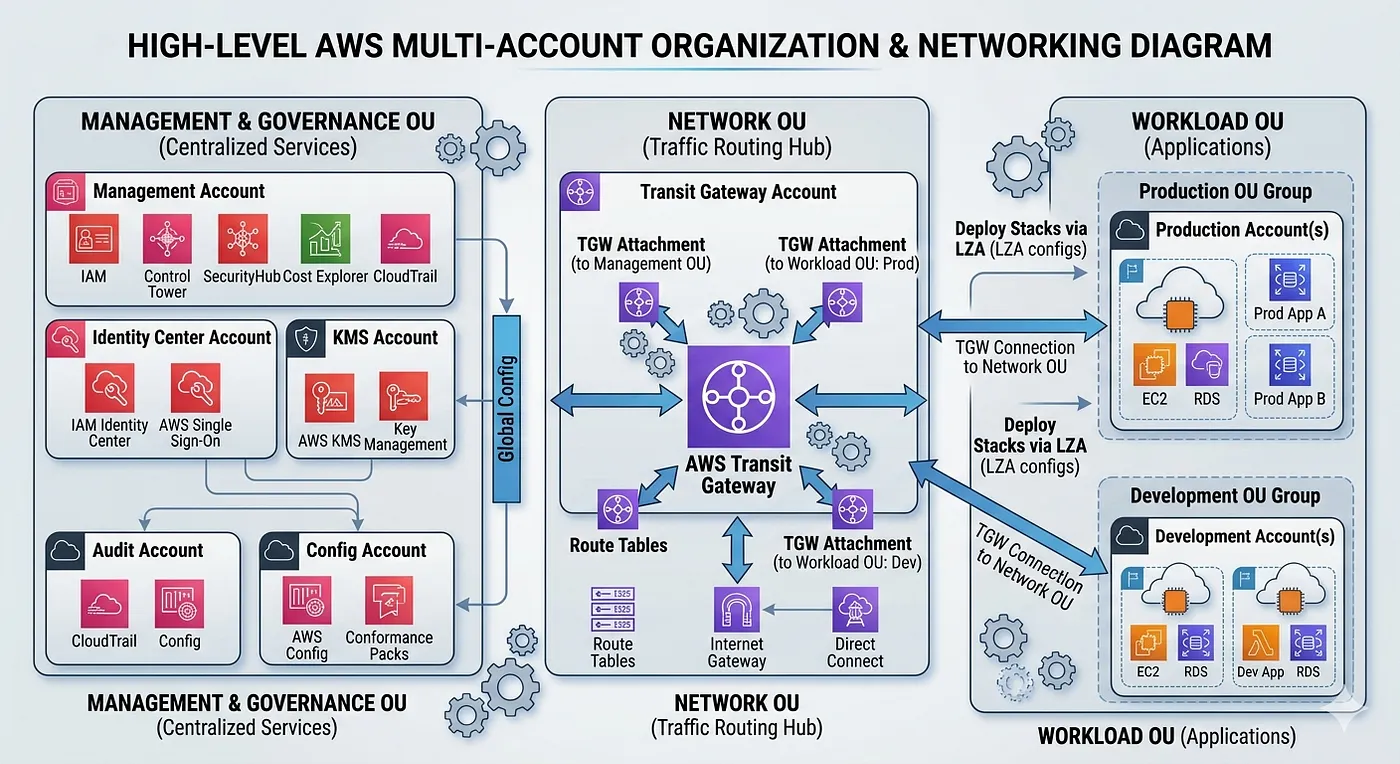
The AWS Organization breaks into three OU’s based on purpose:
Management and Governance OU — Houses the Identity Center account (SSO/SCIM), centralized KMS account (CMKs with cross-account grants), audit account (Org CloudTrail + S3 log archive), and a config/scanning account (Config Aggregator, Security Hub, GuardDuty, Inspector).
Network OU — Contains the Transit Gateway account, which owns one TGW per region. This is the shared network hub — nothing else lives here.
Workload OU — Dev, Prod, and any additional workload accounts (Research, Data Science, customer-specific accounts). Each gets its own VPCs per region.
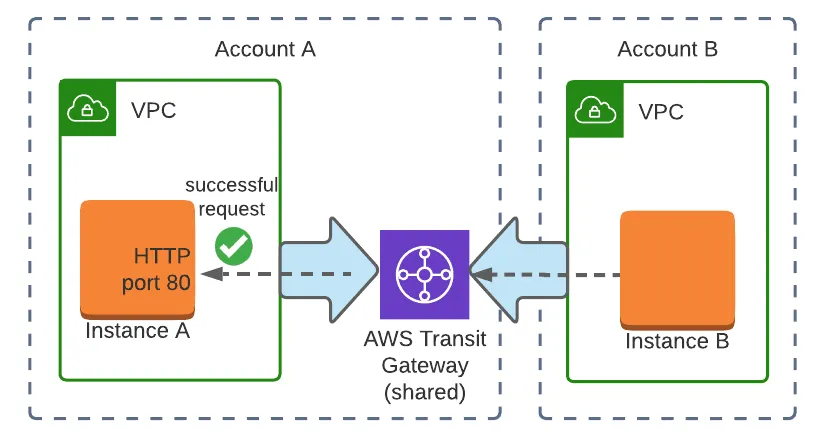
Transit Gateway: Three Route Tables, Zero Overlap
The Transit Gateway in each region maintains three separate route tables:
- Dev RT — Routes to Dev VPC CIDR + Shared VPC CIDR. No route to Prod.
- Prod RT — Routes to Prod VPC CIDR + Shared VPC CIDR. No route to Dev.
- Shared RT — Routes to all VPCs (Dev, Prod, Shared). This is the only route table that sees everything.
Cross-region connectivity is handled through TGW peering between us-east-1 and eu-west-1, associated only with the Shared route tables.
NACLs as Defense-in-Depth
Even with correct TGW route table isolation, NACLs explicitly deny cross-environment CIDRs at the subnet boundary. This is your safety net — if someone misconfigures a route table, the NACLs still block Dev↔Prod traffic:

Why NAT Gateways Per Account (Not Shared)
A common question: “Why not route all internet traffic through a shared NAT Gateway in the Network account?”
Three reasons:
- single-point-of-failure elimination,
- cost isolation (cross-account data transfer via TGW adds up),
- egress traffic isolation per environment.
Each account has its own NAT Gateway per AZ in public subnets. Internet-bound traffic stays local and never traverses the TGW.
Same logic applies to VPC Endpoints — each VPC gets its own set (S3, RDS, SQS, SNS, STS, Kinesis, EBS, CloudWatch, CloudFormation, Elasticsearch, ECR, EKS). AWS service traffic stays within the VPC.
LZA in Practice: Configuration Files That Drive Everything
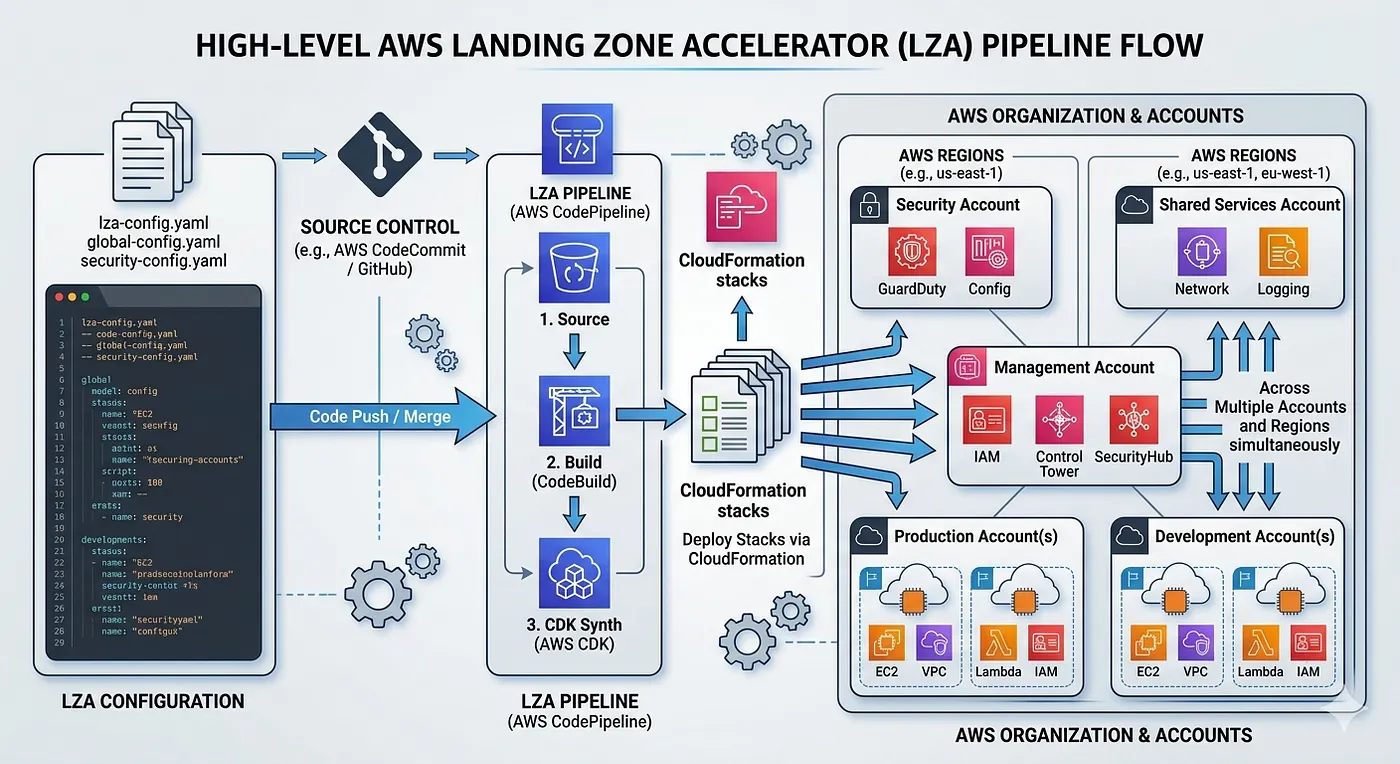
LZA operates through a handful of YAML configuration files stored in an S3-backed CodeCommit/CodePipeline. The CDK application reads these configs, synthesizes CloudFormation stacks, and deploys them across accounts and regions.
Here are the key files for this architecture:
global-config.yaml — regions and baseline
homeRegion: us-east-1
enabledRegions:
  - us-east-1
  - eu-west-1
Simple, but powerful — this tells LZA which regions to deploy resources into. Every account, every guardrail, every networking construct gets replicated to both regions.
organization-config.yaml — Organizational Units structure
organizationalUnits:
  - name: Management and Governance
    ignore: false
  - name: Network
    ignore: false
  - name: Workload
    ignore: false
This is where you define the OU hierarchy. LZA will create these OUs in AWS Organizations and use them as targets for account placement, SCP attachment, and resource sharing (like TGW shares).
workloadAccounts:
  # --- Management and Governance OU ---
  - name: IdentityCenter
    description: IAM Identity Center, SSO, Permission Sets, SCIM
    email: [email protected]
    organizationalUnit: Management and Governance
  - name: KMS
    description: Centralized CMKs, key policies, cross-account sharing
    email: [email protected]
    organizationalUnit: Management and Governance
  - name: Audit
    description: Org CloudTrail, S3 log archive, Athena
    email: [email protected]
    organizationalUnit: Management and Governance
  - name: Config
    description: Config aggregator, Security Hub, GuardDuty, Inspector
    email: [email protected]
    organizationalUnit: Management and Governance
  # --- Network OU ---
  - name: Network
    description: Shared TGW (us-east-1, eu-west-1), Shared VPC
    email: [email protected]
    organizationalUnit: Network
  # --- Workload OU ---
  - name: Dev
    description: Development VPCs us-east-1 + eu-west-1
    email: [email protected]
    organizationalUnit: Workload
  - name: Prod
    description: Production VPCs us-east-1 + eu-west-1
    email: [email protected]
    organizationalUnit: Workload
Each account gets a unique email, a description, and an OU assignment. LZA handles account creation through Control Tower’s Account Factory. Need a new workload account? Add 4 lines of YAML, push, and the pipeline takes care of the rest.
network-config.yaml — The Heavy Lifter
```
transitGateways:
- name: TGW-USE1
account: Network
region: us-east-1
asn: 65000
dnsSupport: enable
vpnEcmpSupport: enable
defaultRouteTableAssociation: disable
defaultRouteTablePropagation: disable
autoAcceptSharingAttachments: enable
shareTargets:
organizationalUnits:
- Workload
routeTables:
- name: TGW-USE1-Dev
routes:
- destinationCidrBlock: 10.10.0.0/16
attachment:
account: Dev
vpcName: Dev-USE1
- destinationCidrBlock: 10.0.0.0/16
attachment:
account: Network
vpcName: Shared-USE1
- name: TGW-USE1-Prod
routes:
- destinationCidrBlock: 10.20.0.0/16
attachment:
account: Prod
vpcName: Prod-USE1
- destinationCidrBlock: 10.0.0.0/16
attachment:
account: Network
vpcName: Shared-USE1
- name: TGW-USE1-Shared
routes:
- destinationCidrBlock: 10.10.0.0/16
attachment:
account: Dev
vpcName: Dev-USE1
- destinationCidrBlock: 10.20.0.0/16
attachment:
account: Prod
vpcName: Prod-USE1
- destinationCidrBlock: 10.0.0.0/16
attachment:
account: Network
vpcName: Shared-USE1
...
Notice defaultRouteTableAssociation: disable and defaultRouteTablePropagation: disable — this is critical. Without these, AWS would auto-associate attachments to a default route table, defeating the entire isolation model. Each VPC attachment explicitly associates with its designated route table.
Securing the network layer
The NACL configuration in the VPC definitions enforces the deny rules:
networkAcls:
  - name: Dev-USE1-NACL
    inboundRules:
      - rule: 100
        protocol: -1
        action: allow
        source: 10.10.0.0/16 # intra-VPC
      - rule: 110
        protocol: -1
        action: allow
        source: 10.0.0.0/16 # Shared services
      - rule: 900
        protocol: -1
        action: deny
        source: 10.20.0.0/16 # Prod CIDR blocked
      - rule: 910
        protocol: -1
        action: deny
        source: 10.120.0.0/16 # Prod EU CIDR blocked
CIDR Allocation Strategy
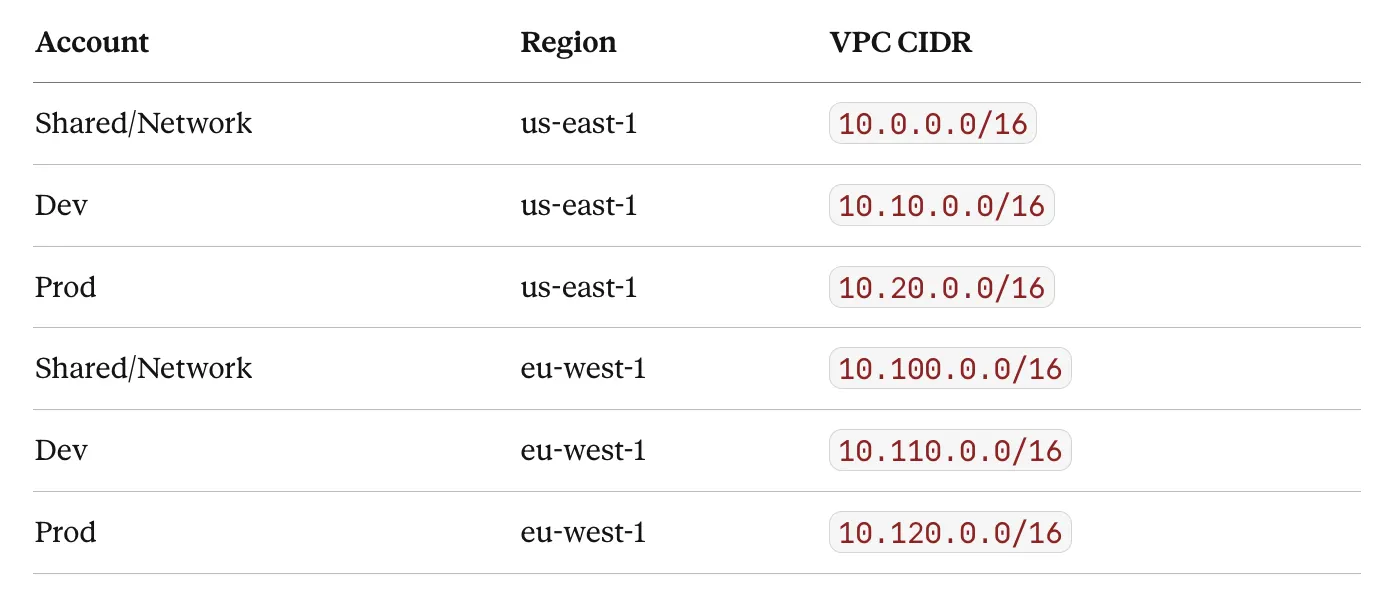
A clean CIDR plan is foundational. I used a /8 supernet (10.0.0.0/8) with IPAM-managed regional sub-pools:
The pattern is intentional:
10.X.0.0/16for US,10.1X0.0.0/16for EU. This makes route tables and NACLs predictable as you add accounts.
Lessons Learned
Start with **network-config.yaml**, not **organization-config.yaml**. The org structure should follow the network topology, not the other way around. Once I had the CIDR plan and isolation model clear, the OU design fell into place.
The LZA pipeline is slow — and that’s fine.
A full run across all accounts and regions takes 45–60 minutes. This isn’t Terraform apply speed, but it’s a one-time foundational deployment. Day-2 changes (new account, new VPC endpoint) are incremental and faster.
NACL rule ordering matters. NACLs are evaluated in order by rule number. The deny rules (900, 910) must come after the allow rules (100–210). I’ve seen teams put deny rules first and wonder why Shared services traffic is blocked.
VPC Endpoints add up. 12 interface endpoints × 2 AZs × 3 VPCs × 2 regions = 144 endpoint ENIs. At ~$7.20/month per endpoint (before data processing), that’s roughly $1,000/month just for endpoints.
Make sure to Budget accordingly, and only deploy endpoints for services you actually use.
Conclusion
AWS Landing Zone Accelerator fills the gap between “I have IAM Identity Center” and “I have a governed, compliance-ready multi-account platform.” For organizations with HIPAA, FedRAMP, or similar compliance requirements across multiple accounts and regions, it provides the declarative configuration layer that Control Tower alone doesn’t offer.
The real value isn’t any single feature — it’s the fact that your entire organization’s network topology, security baseline, and account structure lives in version-controlled YAML files. That’s auditable, repeatable, and reviewable. And for heads of DevOps who’ve been stitching together Terraform modules and custom scripts to achieve the same thing: LZA is worth evaluating as the foundation you build on top of, rather than alongside. The full LZA project is available at github.com/awslabs/landing-zone-accelerator-on-aws, and the implementation guide lives in the AWS docs.
Hope you found this post informative and something you can use when embarking on your Control Tower / Landing Zone project.

