Using S3 as Local Storage on kubernetes with S3 CSI Driver
- Haggai Philip Zagury (hagzag)
- Medium publications
- January 25, 2025
Table of Contents
Originally posted on the Israeli Tech Radar on medium.
TLDR; In the world of cloud-native applications, efficient and scalable storage solutions are crucial. Amazon S3 (Simple Storage Service) is a popular object storage service, but what if you could use it as local storage in your Kubernetes clusters? Enter the S3 CSI (Container Storage Interface) Driver, a game-changer for developers and operations teams alike.
What is the S3 CSI Driver?
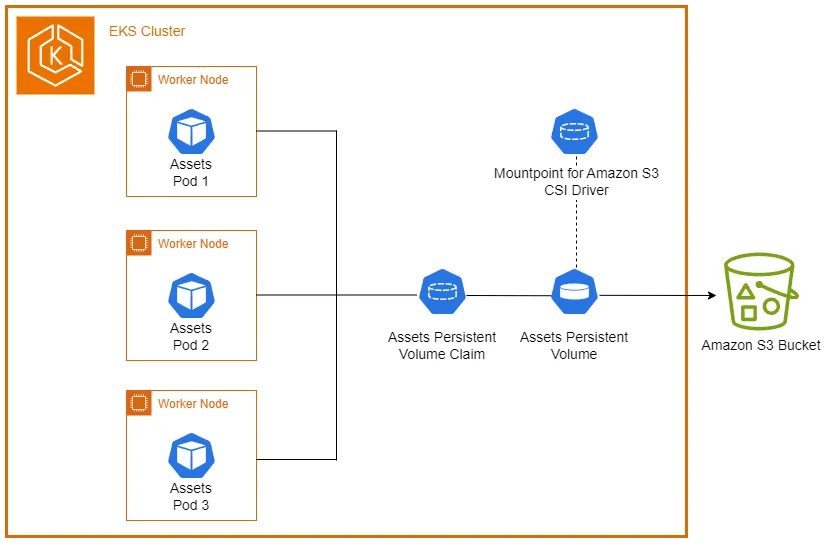
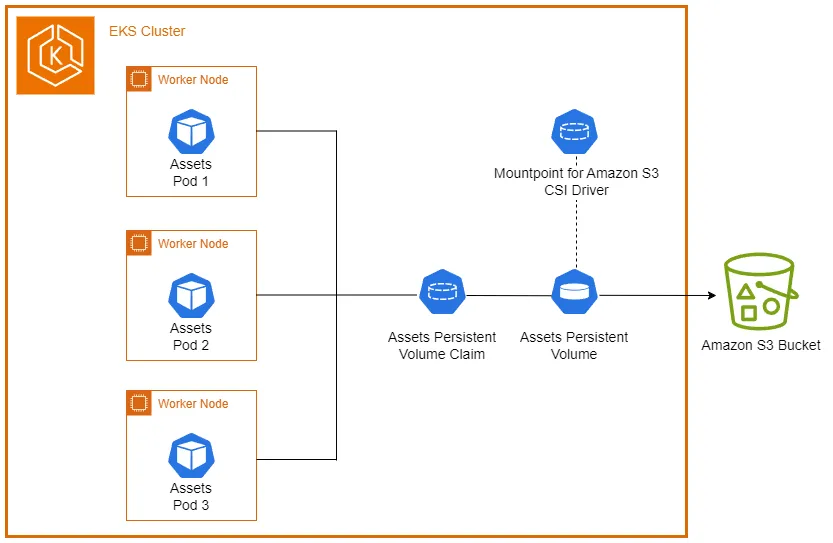
The S3 CSI Driver is a plugin that allows Kubernetes clusters to use Amazon S3 buckets as persistent storage volumes. It bridges the gap between cloud-native object storage and the local file system needs of containerized applications.
Importantly, the S3 CSI driver supports mounting existing buckets, providing a seamless integration with your current S3 infrastructure.
Benefits of using S3 as local storage
Write once run anywhere: If your app treats it as a local folder and it’s s3, it can run locally in development without s3 / s3 alternative e.g minio
Scalability: S3 offers virtually unlimited storage capacity.
Cost-effectiveness: Pay only for the storage you use.
Durability: S3 provides 99.999999999% (11 9’s) of data durability.
Flexibility: Access your data from anywhere, not just within the cluster.
Separation of concerns: Infrastructure teams can manage buckets while developers focus on application logic.
Setting up the S3 CSI Driver
To use S3 as local storage, you need to set up the S3 CSI Driver in your Kubernetes cluster.
Here’s a high-level overview:
Start by installing the S3 CSI Driver in your cluster using helm The official helm chart is available here I installed it on eks version 1.31.
Make sure to create a role and an irsa / pod identity association to the controllers service account, configure the driver with appropriate IAM permissions and trust policy something like the following:
{
 "Version": "2012-10-17",
 "Statement": [
      {
       "Effect": "Allow",
       "Principal": {
        "Federated": "arn:aws:iam::XXXXXXXX:oidc-provider/oidc.eks.<aws-region>.amazonaws.com/id/<cluster-oidc-dentifier>"
       },
       "Action": "sts:AssumeRoleWithWebIdentity",
       "Condition": {
        "StringEquals": {
         "oidc.eks.eu-west-1.amazonaws.com/id/77165DB5EDA8217E458CA2FE1C7957F8:sub": "system:serviceaccount:kube-system:s3-csi-driver-sa",
         "oidc.eks.eu-west-1.amazonaws.com/id/77165DB5EDA8217E458CA2FE1C7957F8:aud": "sts.amazonaws.com"
        }
       }
      }
     ]
    }
This role will requires iam permissions to s3 and you want them with the least privilege approach something like the following:
{
  "Statement": [
    {
        "Action": "s3:ListBucket",
        "Effect": "Allow",
        "Resource": "arn:aws:s3:::developers-bucket",
        "Sid": "MountpointFullBucketAccess"
    },
    {
        "Action": [
            "s3:PutObject",
            "s3:GetObject",
            "s3:DeleteObject",
            "s3:AbortMultipartUpload"
        ],
        "Effect": "Allow",
        "Resource": "arn:aws:s3:::developers-bucket/*",
        "Sid": "MountpointFullObjectAccess"
    }
  ],
  "Version": "2012-10-17"
}
Finallu in your eks cluster create a StorageClass for S3 like so:
apiVersion: storage.k8s.io/v1
kind: StorageClass
metadata:
  name: s3
provisioner: s3.csi.aws.com
parameters:
  type: standard
In our example, we assume these steps have been completed by the infrastructure team using terraform code and the eks-addons module to configure the s3-csi-plugin and the requires permissions to read and write (not delete) from the bucket named developers-bucket.
Configuring and using S3 as local storage
To use an S3 bucket as local storage, you need to create a PersistentVolume (PV) and a PersistentVolumeClaim (PVC).
Here’s an example:
apiVersion: v1
kind: PersistentVolume
metadata:
  name: s3-pv-developers-bucket
spec:
  capacity:
    storage: 5Gi
  volumeMode: Filesystem
  accessModes:
    - ReadWriteMany
  persistentVolumeReclaimPolicy: Retain
  storageClassName: s3
  csi:
    driver: s3.csi.aws.com
    volumeHandle: developers-bucket
    volumeAttributes:
      bucketName: developers-bucket
      mountOptions: "--dir-mode=0777 --file-mode=0666"
---
apiVersion: v1
kind: PersistentVolumeClaim
metadata:
  name: s3-pvc-developers-bucket
spec:
  accessModes:
    - ReadWriteMany
  storageClassName: s3
  resources:
    requests:
      storage: 5Gi
  volumeName: s3-pv-developers-bucket
To use this storage in a pod, add the following to your pod spec:
apiVersion: apps/v1
kind: Deployment
  metadata:
    name: s3-app
  spec:
    replicas: 1
    selector:
      matchLabels:
        app: s3-app
    template:
      metadata:
        labels:
          app: s3-app
      spec:
        containers:
        - name: app-container
          image: ubuntu:latest
          command: ["/bin/sh"]
          args: ["-c", "while true; do sleep 30; done;"]
          volumeMounts:
          - name: s3-storage
            mountPath: /data
        volumes:
        - name: s3-storage
          persistentVolumeClaim:
            claimName: s3-pvc-developers-bucket
If we kubectl exec into this container we can read and write to /data as if it was local storage.
Best practices and considerations for s3 and object storage in general
Security: Ensure proper IAM permissions and consider using encryption at rest. As described above the firstname-lastname + you cannot delete an object, just create new ones.
Performance: S3 as local storage may not be suitable for high-performance, low-latency applications. For batch / etl processes this method is sufficient.
Costs: Monitor your S3 usage to avoid unexpected costs, always true ;)
Backup: Even though S3 is highly durable, consider implementing backup strategies for critical data, modifying storage class for objects older than n days etc.
Versioning: Enable S3 versioning for additional data protection.
Conclusion
The S3 CSI Driver opens up new possibilities for using Amazon S3 as local storage in Kubernetes environments. It combines the scalability and durability of S3 with the flexibility of local storage, offering a powerful solution for cloud-native applications, by following the configuration steps and best practices outlined in this post, you can effectively leverage S3 as local storage in your Kubernetes deployments.
As mentioned this setup was done on eks, i’m curious to test how I could do this locally with minio ink3d I use for my local experiment needs …
Your Sincerely, HP