TL;DR
“Masked” variables in GitLab and “encrypted” secrets in GitHub give teams a false sense of security. The secret is still stored on the CI platform, still accessible to any pipeline with the right permissions, and still a long-lived credential that can be leaked. The fix is OIDC — your runner proves its identity to an external secrets manager, gets a short-lived token, fetches what it needs, and nothing persists. No stored credential, no blast radius. This post shows exactly how to wire it up for HashiCorp Vault, AWS Secrets Manager, and GCP Secret Manager on both platforms.
This is a follow-up to the Cloudflare WARP for private endpoint connectivity post. That covered the network layer of pipeline security — getting a runner inside your private perimeter. This covers the secrets layer — what runs inside that perimeter, and where those credentials actually live.
The Debug Step That Ended a Friday Afternoon
A developer adds a debug step to a failing pipeline. Totally reasonable — echo "Connecting to: $DB_HOST" — except the next line is echo "Using: $DB_PASSWORD" and GitLab’s masking didn’t catch it because it was URL-encoded. The job log is visible to every developer in the project. That’s not a theoretical attack vector; that’s a commit away from happening in any team that relies on CI platform secrets as a security boundary.
The deeper issue isn’t the accidental echo. It’s that the credential was there to be leaked. A static secret stored in GitHub Actions or GitLab CI is a long-lived credential sitting in a centrally managed store, accessible to anyone who can run a pipeline, visible to anyone who can access the platform’s secret storage, and rotated approximately never because rotation means touching every repository that uses it.

What “Masked” and “Encrypted” Actually Mean
Here is what the platforms actually give you:
GitLab CI Variables — the “Masked” checkbox prevents the literal string from appearing in job logs. It does not prevent a pipeline from exfiltrating the value via a curl request, an environment dump, or a creative use of set -x. The “Protected” checkbox restricts the variable to protected branches — helpful for reducing exposure surface, not helpful if an attacker has push access to a protected branch.

GitHub Actions Secrets — secrets are encrypted at rest and never shown in the UI after creation. They are still injected as environment variables into the runner process. Any step in the job can read them. Any action you use — including third-party actions from the marketplace — runs in the same process and can read all environment variables in scope.
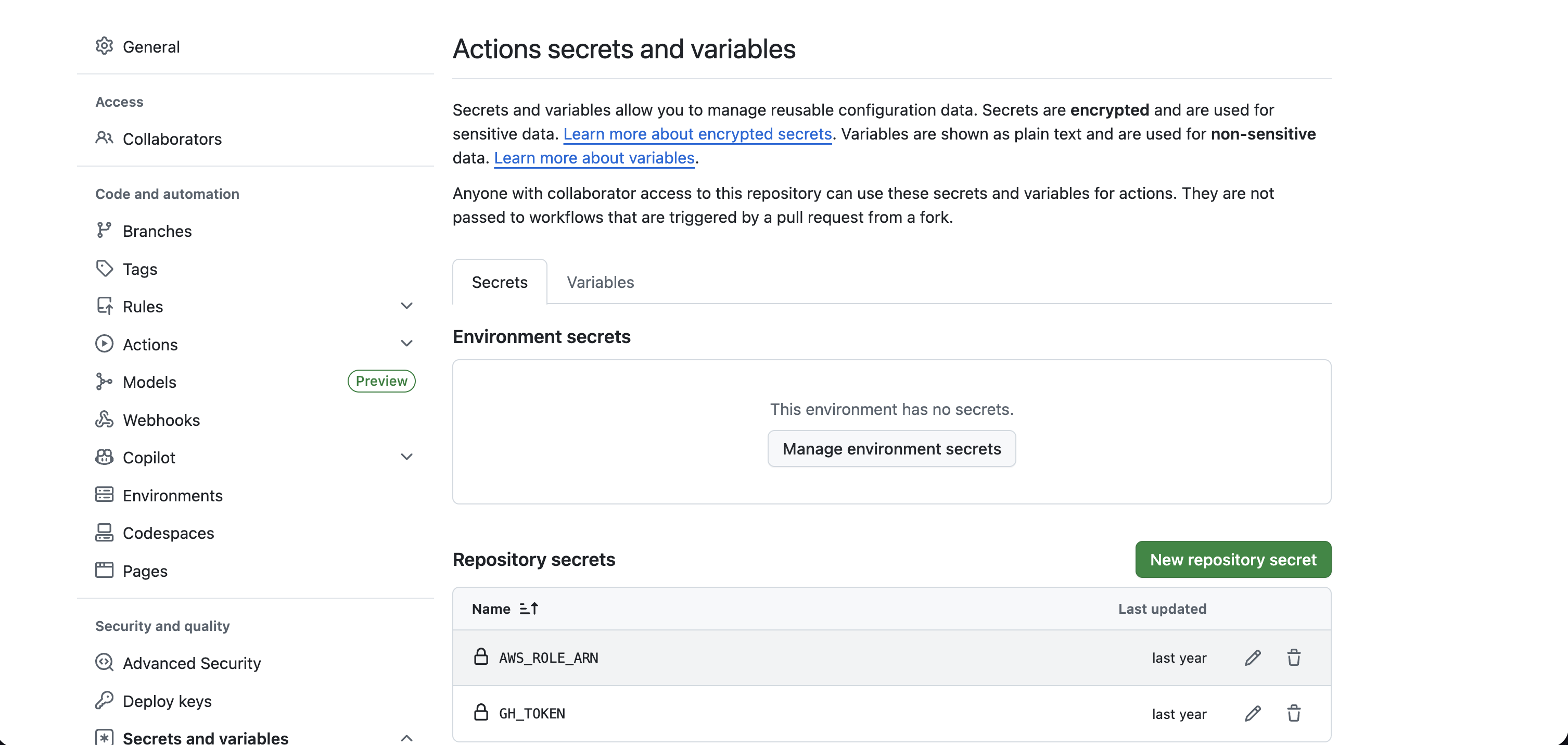
Neither of these is wrong — they are appropriate for low-sensitivity configuration values. They are not appropriate for database passwords, API keys with write access, cloud provider credentials, or anything you would call a secret in a compliance conversation.
The Model That Actually Works: OIDC + Dynamic Secrets
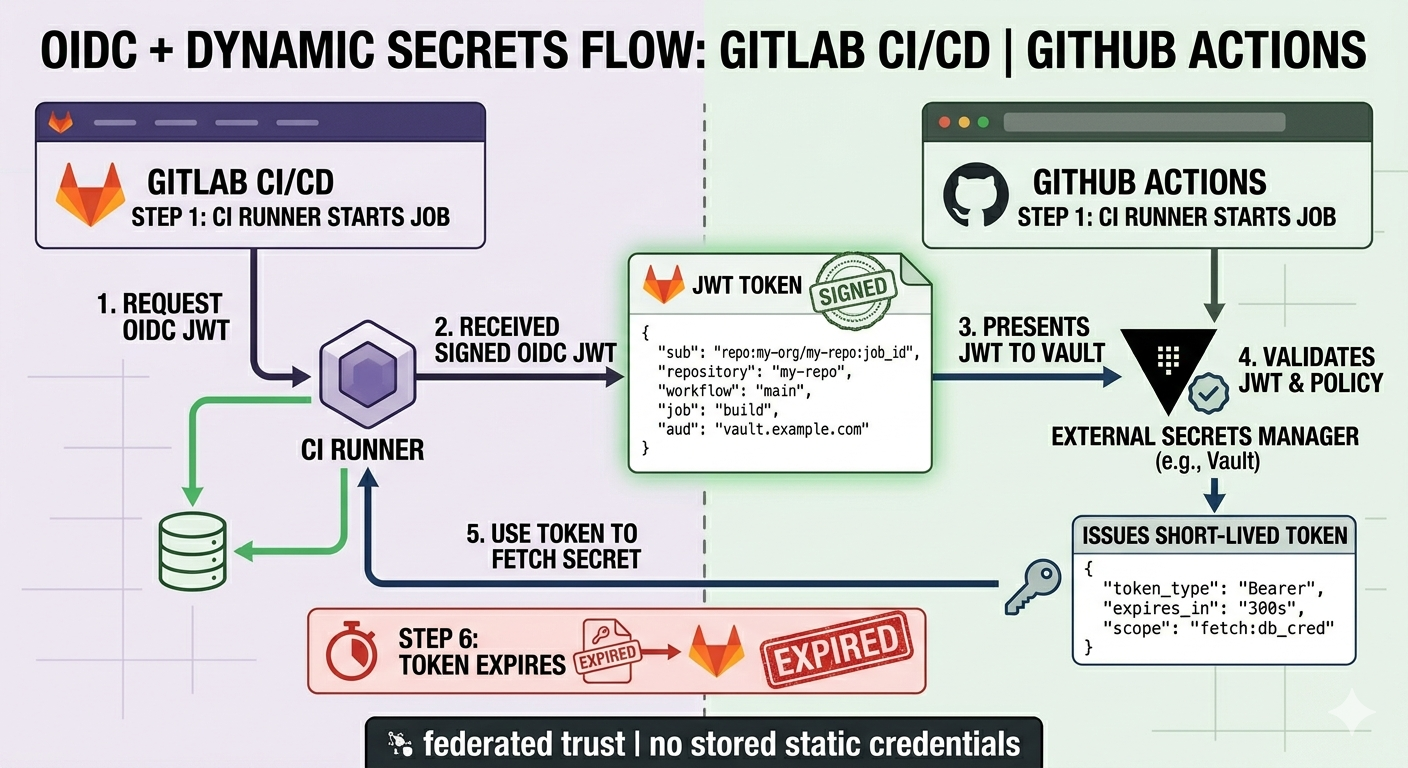
The shift is conceptual before it’s technical: instead of storing a credential on the CI platform and injecting it at runtime, the runner proves who it is to an external secrets manager and receives a short-lived, scoped token in exchange. That token expires in minutes. Nothing is stored on the CI platform. If a job log is leaked, there’s nothing in it worth stealing.
Both GitHub Actions and GitLab CI support OIDC natively. The runner gets a signed JWT at job start — signed by GitHub’s or GitLab’s OIDC provider — containing claims about the repository, branch, workflow name, and environment. An external secrets manager trusts that OIDC provider, validates the JWT, checks the claims against a policy, and issues access. The trust is federated. No long-lived credential ever crosses from your secrets manager to the CI platform.
HashiCorp Vault: vault-action
The hashicorp/vault-action GitHub Action supports JWT authentication out of the box. Configure Vault’s JWT auth method to trust GitHub’s OIDC provider, bind claims to Vault policies, and the action handles the rest:
- name: Import secrets from Vault
  uses: hashicorp/vault-action@v3
  with:
    url: https://vault.internal.example.com
    method: jwt
    # GitHub OIDC token is automatically available as ACTIONS_ID_TOKEN_REQUEST_TOKEN
    jwtGithubAudience: https://github.com/your-org
    secrets: |
      secret/data/myapp/prod db_password | DB_PASSWORD ;
      secret/data/myapp/prod api_key    | API_KEY
  # exported as environment variables for subsequent steps — scoped to this job
The Vault policy attached to this JWT role can be locked to a specific repository, branch, or environment claim. A pipeline running on refs/heads/main in your-org/your-repo gets the prod secrets. A PR branch from a fork gets nothing. That’s a boundary CI platform secrets can’t draw.
GitLab has native Vault integration built into the CI secrets keyword — no action required:
job:
  secrets:
    DB_PASSWORD:
      vault: myapp/prod/db_password@https://vault.internal.example.com
      # GitLab exchanges its JWT for a Vault token using the configured JWT auth method
  script:
    - echo "DB_PASSWORD is available but never stored in GitLab"
AWS Secrets Manager and Parameter Store
On AWS, aws-actions/aws-secretsmanager-get-secrets pairs with OIDC via the standard aws-actions/configure-aws-credentials step. The runner assumes an IAM role — scoped by subject claim — and fetches only what the role’s policy allows:
- name: Configure AWS credentials via OIDC
  uses: aws-actions/configure-aws-credentials@v4
  with:
    role-to-assume: arn:aws:iam::123456789012:role/github-actions-myapp-prod
    aws-region: us-east-1
    # role trust policy restricts to: repo:your-org/your-repo:ref:refs/heads/main

- name: Fetch secrets from AWS Secrets Manager
  uses: aws-actions/aws-secretsmanager-get-secrets@v2
  with:
    secret-ids: |
      myapp/prod/db,    DB_
      myapp/prod/api,   API_
    # populates DB_DB_PASSWORD, DB_HOST, API_KEY etc. as env vars
For SSM Parameter Store, the same OIDC-assumed role works — swap the action for a direct aws ssm get-parameter call or use the AWS SSM action. Both approaches: nothing stored in GitHub, role expires with the OIDC session.
For GCP, Workload Identity Federation is the equivalent — google-github-actions/auth handles the OIDC exchange, then google-github-actions/get-secretmanager-secrets fetches from Secret Manager under the same scoped service account.
The Part That Bit Us
The OIDC subject claim format is non-obvious and easy to misconfigure. GitHub’s default subject for a workflow run looks like:
repo:your-org/your-repo:ref:refs/heads/mainBut for a workflow triggered by a pull request it becomes:
repo:your-org/your-repo:pull_requestThe first time we set this up, we locked the Vault role to the main branch subject claim — and then discovered that the deployment workflow also runs on PR merge events, which produce a slightly different subject. The pipeline failed at the Vault auth step with a generic “permission denied” and no indication of which claim didn’t match. We spent two hours ruling out network issues before realising it was the subject format.
Fix: use Vault’s bound_claims with a wildcard for the ref, or use a dedicated deployment role that matches on repository alone with environment as a secondary control. More importantly: test your OIDC claim format in a dry-run before wiring it to production secrets.
The second cost is operational: OIDC trust configuration lives in your secrets manager, not your repository. That’s good for security (developers can’t change their own trust policies) but means the platform team owns a new surface area. Budget time for it.
Conclusion
The “masked” checkbox and “encrypted at rest” guarantee are table stakes, not security. Real pipeline secret hygiene means no long-lived credentials on the CI platform — full stop. OIDC + an external secrets manager gets you there: the runner proves its identity, gets exactly what it needs for exactly as long as it needs it, and leaves nothing behind. The setup takes a few hours the first time. The credential breach it prevents takes considerably longer to clean up.
Add to GLOSSARY const in src/layouts/PostLayout.astro: ‘JWT’: { full: ‘JSON Web Token’, url: ‘https://datatracker.ietf.org/doc/html/rfc7519’ }, ‘SSM’: { full: ‘AWS Systems Manager (includes Parameter Store)’, url: ‘https://docs.aws.amazon.com/systems-manager/latest/userguide/what-is-systems-manager.html’ }, ‘GCP’: { full: ‘Google Cloud Platform’, url: ‘https://cloud.google.com/’ }, ‘KV’: { full: ‘Key-Value (secrets engine in HashiCorp Vault)’, url: ‘https://developer.hashicorp.com/vault/docs/secrets/kv’ }, —>
Discussion