TL;DR
Cilium replaces the Kubernetes NetworkPolicy engine with an eBPF datapath that enforces rules based on workload identity, not pod IP. This post installs Cilium on a local k3d cluster, walks a CiliumNetworkPolicy progression from no-policy to default-deny to L4 allow to L7 HTTP filtering to egress lockdown, and shows you exactly what each step looks like in Hubble. Runs on a laptop in about ten minutes.
Introduction
The reason I went looking for Cilium was practical: a recent customer cluster had a baseline NetworkPolicy that should have allowed all internal traffic, and instead silently dropped everything. The cause was a bug in the VPC-CNI’s policy agent, fixed in a later release, but the lesson was bigger than the patch — the engine doing the enforcement matters, and most teams treat it as an interchangeable detail.
It is not an interchangeable detail. The engine decides what policies you can even express, what the failure mode looks like when something goes wrong, and what you can observe after the fact. Cilium has had years of production scale, a wide user base, and a model that looks less like “iptables rules generated from labels” and more like “an identity-aware firewall talking to the kernel directly.” That model deserves an hour on your laptop before you commit to it on EKS, and that’s what this post is.
We’ll keep the editorial parts tight and let the lab do most of the talking.

Part 1: the mental model — eBPF, identity, and Hubble
Before we install anything, three ideas to keep in mind.
eBPF runs your enforcement in the kernel, not in iptables. eBPF is a mechanism the Linux kernel exposes for running small, verified programs in response to kernel events — packets arriving on an interface, syscalls being made, sockets opening. Cilium attaches eBPF programs at the network hooks and walks its own policy maps to decide whether a packet is allowed. iptables is still loadable on the box, but Cilium isn’t using it. The practical effect is that you don’t get the “1,000 pods, 5,000 rules, every packet walks the chain” scaling problem; the eBPF map lookup is O(1) on a hash.

Cilium enforces on identity, not on IP. When you write a standard Kubernetes NetworkPolicy, the engine has to translate “pods with label app=frontend” into “this list of pod IPs,” and update that list every time a pod is rescheduled. Cilium assigns each unique combination of labels a security identity (a numeric ID) and writes the policy against the identity. When a packet leaves a pod, the source’s identity travels with it (in IP options for native routing, in the VXLAN header for overlay). The destination’s eBPF program looks up “is identity 12345 allowed to reach me on TCP/80?” — no IP list to maintain, no stale entries when a pod restarts.

Hubble is the observability layer that makes the above legible. Every packet decision Cilium makes is observable, with the workload identity, namespace, pod, L4 protocol, and (when L7 policies are present) HTTP method, path, status code, and gRPC method. This is the difference between “the connection failed” and “frontend tried to POST /admin on backend at 10:32:14, denied by policy allow-frontend-to-backend rule 1.”

Now let’s build it.

Part 2: the k3d cluster — no kube-proxy, Cilium as the CNI
We want k3d to give us nodes with kube-proxy and the built-in network-policy controller disabled — Cilium is the kube-proxy replacement and the CNI. The k3d/cluster.yaml in the companion repo does exactly that:
options:
  k3s:
    extraArgs:
      - arg: "--disable-network-policy"          # no built-in netpol controller
        nodeFilters: ["server:*"]
      - arg: "--disable=traefik"                 # no ingress competition
        nodeFilters: ["server:*"]
      - arg: "--disable-kube-proxy"              # Cilium replaces kube-proxy
        nodeFilters: ["server:*"]
One thing worth noting: we deliberately keep flannel running at boot. The k3s node images don’t ship standalone CNI binaries at /opt/cni/bin/ — if you pass --flannel-backend=none, those binaries are absent, kubelet can’t admit pods, and Cilium itself can’t initialize. The cleaner path (and the one the Cilium project documents for k3d) is to let flannel provide networking for the ~30 seconds it takes to install Cilium, then let Cilium evict flannel via cni.exclusive: true in the Helm values.
Bring it up:
task part1:clusterNodes will come up Ready via flannel. Cilium takes over the data plane in the next step.
Part 3: install Cilium
The companion repo ships a small Helm values file tuned for k3d. The interesting bits:
kubeProxyReplacement: true        # Cilium becomes the L4 LB
ipam:
  mode: kubernetes                # use the per-node PodCIDR
routingMode: native               # no overlay inside a single Docker network
hubble:
  enabled: true
  metrics:
    enabled:
      - dns
      - drop
      - tcp
      - flow
      - port-distribution
      - icmp
      - "httpV2:exemplars=true;labelsContext=source_ip,source_namespace,source_workload,destination_ip,destination_namespace,destination_workload,traffic_direction"
  relay:
    enabled: true
  ui:
    enabled: true
kubeProxyReplacement: true means Cilium handles all the Service/ClusterIP/NodePort load balancing in eBPF. The Hubble metrics list is the thing to copy from this file into yours — without httpV2, you won’t see HTTP-level data in the UI.
Install:
task part1:ciliumWithin thirty seconds the Cilium agents and operator come up, the nodes flip to Ready, and you have a Kubernetes cluster whose entire data plane is eBPF. Sanity-check it with the Cilium CLI (optional but worth installing):
cilium status
cilium connectivity test --test pod-to-pod   # ~2 minutes
Part 4: the demo workloads
Three pods, two namespaces:
demo/frontend— a curl-loop pod that pretends to be a legitimate callerdemo/backend— httpbin (it echoes method, path, and headers, perfect for L7)attacker/attacker— a curl pod in a separate namespace, no relation to backend
task part1:appsThe attacker namespace exists so we can prove the identity-aware enforcement. From a vanilla iptables perspective, the attacker pod’s IP is indistinguishable from any other pod’s IP. From Cilium’s perspective, it has a different identity, and that’s all that matters.
Part 5: the policy progression — five steps
The lab ships five policies under practice/part1/policies/, applied in order. After each step we run the same four probes:
frontend  -> backend GET /get        (a legitimate call)
frontend  -> backend POST /post      (legitimate, but a write)
attacker  -> backend GET /get        (lateral movement attempt)
backend   -> internet (1.1.1.1)      (egress to the world)
Run the whole thing interactively:
task part1:demoHere’s what each step proves.
Step 0 — no policy
All four probes succeed. The cluster is fully open, exactly as Kubernetes ships it. This is the default many people don’t realize they’re running.
Step 1 — default-deny
apiVersion: cilium.io/v2
kind: CiliumNetworkPolicy
metadata:
  name: default-deny
  namespace: demo
spec:
  endpointSelector: {}      # match every pod in demo
  ingress:
    - {}                    # match nothing -> deny all
  egress:
    - {}                    # match nothing -> deny all
All four probes fail. Including DNS, which is in the next step. The “empty rule matches nothing” idiom is the cleanest way to express deny-all in CiliumNetworkPolicy.
Step 2 — allow DNS
egress:
  - toEndpoints:
      - matchLabels:
          "k8s:io.kubernetes.pod.namespace": kube-system
          "k8s:k8s-app": kube-dns
    toPorts:
      - ports:
          - { port: "53", protocol: UDP }
          - { port: "53", protocol: TCP }
A note on the L7 DNS proxy: Cilium supports a rules.dns.matchPattern: "*" extension that installs an L7 DNS proxy and surfaces every queried hostname in Hubble. In production clusters (Linux with full kernel modules) this is worth enabling — it lets you watch DNS traffic in real time and write toFQDNs policies later. On macOS Docker Desktop, however, the k3d node images cannot load iptables modules, so Cilium falls back to legacy host routing without conntrack. Without conntrack the DNS proxy cannot match responses to their queries, and default-deny drops the reply. The lab therefore uses plain L4 UDP/53, which works identically for enforcement purposes. Hubble still shows flow-level visibility; you just won’t see per-query DNS names.
task part1:hubble
# then visit http://localhost:12000
App traffic is still denied at this point; only the DNS leg works.
Step 3 — allow frontend → backend (L4 only)
spec:
  endpointSelector:
    matchLabels: { app: backend }
  ingress:
    - fromEndpoints:
        - matchLabels: { app: frontend }
      toPorts:
        - ports: [{ port: "80", protocol: TCP }]
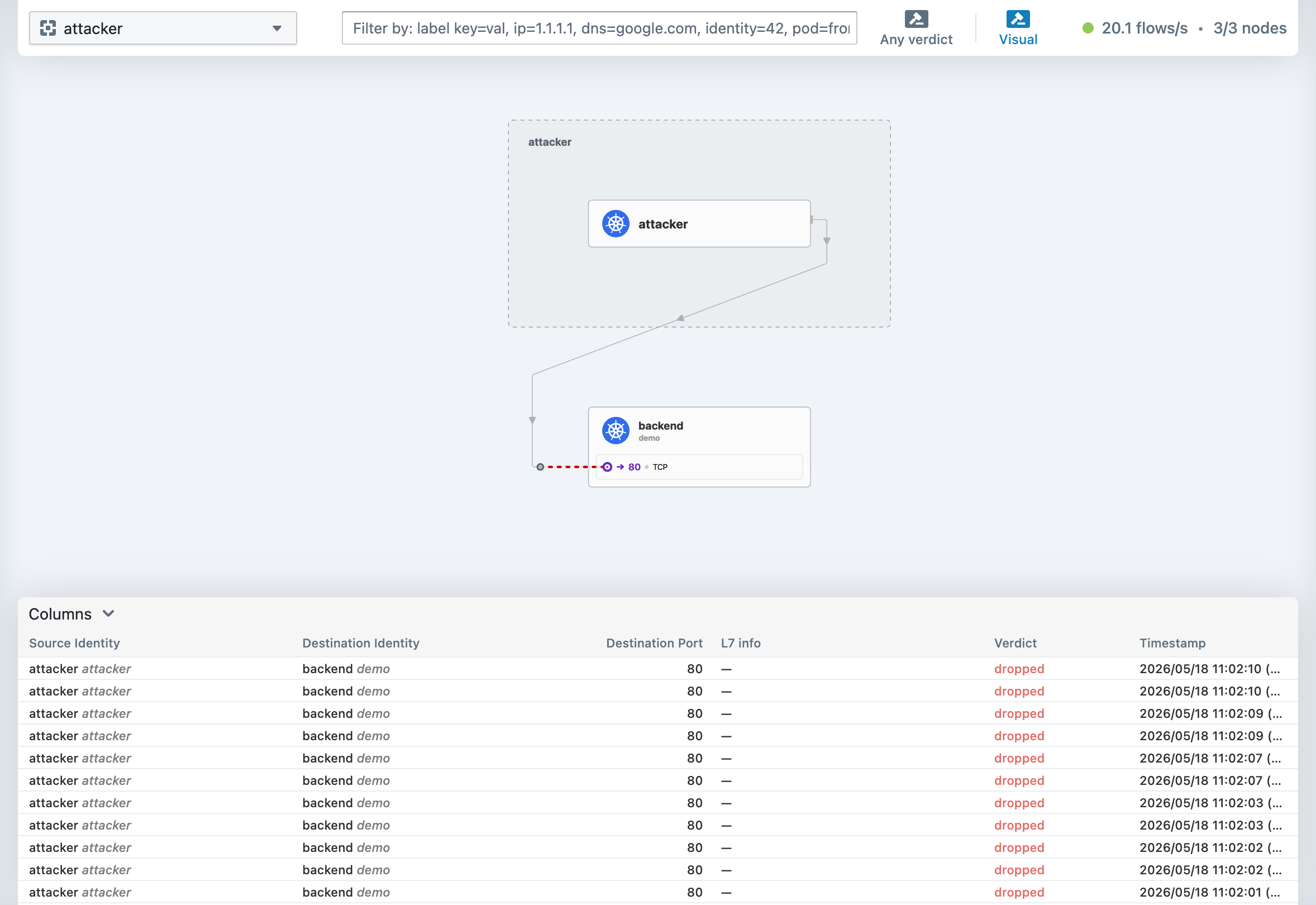
Frontend → backend works. The attacker probe still fails. This is the identity-aware enforcement made concrete: the attacker pod’s IP is no different from frontend’s, but its identity is, and the policy is written against the identity.
Step 4 — restrict to L7: only GET /get* and /headers
Same rule, with an L7 block bolted on:
toPorts:
  - ports: [{ port: "80", protocol: TCP }]
    rules:
      http:
        - method: "GET"
          path: "/get.*"
        - method: "GET"
          path: "/headers"
GET /get returns 200. POST /post from frontend returns 403 — note, not “connection refused.” Cilium injected an Envoy-style proxy in the data path, the request reached it, and the proxy rejected it at L7. In Hubble you’ll see the request with verdict: FORWARDED to the proxy and then a denied L7 event. This is the policy you cannot express in a vanilla Kubernetes NetworkPolicy.
Platform note for macOS Docker Desktop. The L7 HTTP proxy relies on the xt_socket kernel module for socket-level redirect, which is not available inside the k3d node containers on Docker Desktop (same limitation as the L7 DNS proxy discussed in Step 2). The Cilium agent logs "xt_socket kernel module could not be loaded" at startup, and the proxy falls back to a mode where it intercepts the connection but cannot forward the response back. Hubble shows the to-proxy verdict (proving the policy is active, identity-based, and the proxy intercepts), but the actual HTTP request times out instead of receiving a 403 or 200.
On a native Linux host — bare metal, VM, or cloud instance — the L7 proxy works fully and you’ll see the correct 200/403 responses.

Step 5 — backend’s egress to the world
The earlier default-deny technically already blocks backend → 1.1.1.1, but we tighten it further: we grant backend an explicit intra-cluster + DNS egress policy and add a named deny rule so the drop shows up with a label in Hubble. The file ships both resources:
apiVersion: cilium.io/v2
kind: CiliumNetworkPolicy
metadata:
  name: backend-egress-restrict
  namespace: demo
spec:
  endpointSelector:
    matchLabels:
      app: backend
  egress:
    # Allow DNS
    - toEndpoints:
        - matchLabels:
            "k8s:io.kubernetes.pod.namespace": kube-system
            "k8s:k8s-app": kube-dns
      toPorts:
        - ports:
            - port: "53"
              protocol: UDP
    # Allow only intra-cluster traffic.
    - toEntities:
        - cluster
---
apiVersion: cilium.io/v2
kind: CiliumClusterwideNetworkPolicy
metadata:
  name: deny-backend-to-world
spec:
  endpointSelector:
    matchLabels:
      "k8s:io.kubernetes.pod.namespace": demo
      app: backend
  egressDeny:
    - toEntities: [world]
toEntities: world is one of Cilium’s reserved identities — any IP outside the cluster. It pairs with toEntities: cluster, host, kube-apiserver, and a few others. These are the building blocks for “deny everything to the internet” without enumerating IPs.

Part 6: read the drops in Hubble
The point of Hubble is not the UI — it’s the structured event stream. The same data is available from the CLI:
kubectl -n kube-system exec ds/cilium -- hubble observe \
  --verdict DROPPED --follow
Each line shows the source identity, destination identity, L4 protocol, L7 details (if any), and the rule that matched. When you’re chasing a real denial in production, this is the difference between “the connection failed somewhere” and “policy app=frontend → app=backend denied POST /admin.” The latter is the only kind of evidence that’s useful in a postmortem.
A useful exercise: open Hubble UI, run the task part1:demo walkthrough, and watch the service map redraw at every step. After step 4 you’ll see the frontend → backend edge labeled with HTTP methods and paths, not just IPs.

Part 7: the production pattern — ship the policy with the app
A pattern I use on every Cilium-enabled cluster: the application’s Helm chart ships its own CiliumNetworkPolicy, so the policy moves with the workload and never lags it. The lab includes a practice/part1/helm-chart/ demo of this:
helm install demo ./practice/part1/helm-chart \
  -n tenant-demo --create-namespace
The chart’s templates/networkpolicy.yaml renders a CiliumNetworkPolicy from values.yaml, with a Helm hook (pre-install,pre-upgrade, weight -5) so the policy lands a moment before the Deployment. That ordering matters — without it there’s a small window where the workload exists but is unprotected.
The platform owns the cluster-wide guardrails (default-deny templates, deny-world, kube-system protections) as a separate chart. Each application owns its own L7 rules. This separation is what scales as you onboard teams.
Wrap-up and what’s next
You now have a working Cilium cluster on your laptop, five policies that demonstrate the full identity-aware progression, Hubble flow logs proving each step, and a Helm pattern you can lift into a real chart. The repo is at github.com/hagzag/cilium-in-practice — the part1/ folder is self-contained.
Part 2 takes everything here to EKS. Same probes, same policies, but now the questions are different: do you replace VPC-CNI, chain Cilium on top of it, or run them side by side? What breaks when you add the AWS Load Balancer Controller? What does Hubble Relay look like at production scale? And — because it’s the reason I started looking at Cilium for EKS in the first place — what about that VPC-CNI silent-drop bug?
See you there.
Lab — Try It Yourself
git clone https://github.com/hagzag/cilium-in-practice
cd cilium-in-practice
task check-tools
task part1:run        # cluster + Cilium + apps
task part1:demo       # walk the 5-step policy progression
task part1:test       # automated assertions
task part1:hubble     # open Hubble UI at localhost:12000
task part1:cleanup    # delete the k3d cluster
Recordings of the full walkthrough:
Lab folder: practice/part1/
Discussion