TL;DR
The tf-live directory structure maps directly to your AWS account topology: account / region / environment / module. Each level has one .hcl file. root.hcl reads them all via find_in_parent_folders at runtime and generates a unique S3 state key and a provider block per module. OIDC short-lived tokens replace static IAM keys. The whole thing bootstraps in one local apply and then runs through CI forever after.
The day allowed_account_ids saved production
We were onboarding a second AWS account. The management account’s OIDC role had permissions to assume roles in both accounts. A CI job was misconfigured — the matrix entry had the wrong account directory, so the provider block pointed at dev but was about to apply prod changes.
The pipeline failed with: Error: the account is not in the allowed account IDs list.
That’s allowed_account_ids in the generated provider block doing its job. One field. Zero infrastructure changed. The misconfiguration was caught before the first API call.
I now consider this the single most underrated line in any Terragrunt setup.
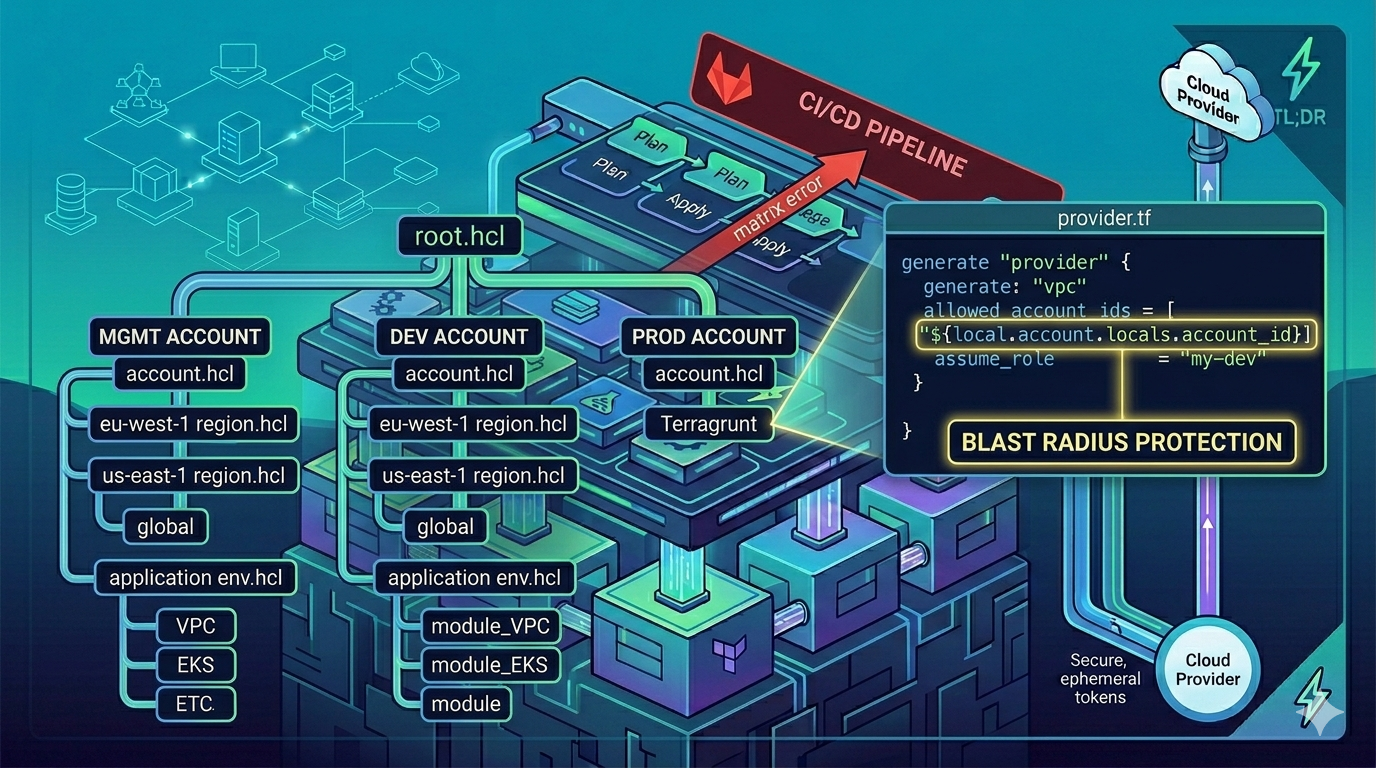
The hierarchy and what each file does
tf-live/
├── root.hcl          # Assembles everything; generates backend.tf + provider.tf
├── proj.hcl          # Project-wide: module repo URL, pinned tag, org name, resource tags
├── mgmt/             # Management account (IAM Identity Center)
│   ├── account.hcl
│   └── eu-west-1/
│       ├── region.hcl
│       └── global/
│           ├── env.hcl
│           ├── github-oidc/  → terragrunt.hcl
│           └── gitlab-oidc/  → terragrunt.hcl
├── dev/
│   ├── account.hcl
│   └── eu-west-1/
│       ├── region.hcl
│       ├── dev/
│       │   ├── env.hcl
│       │   ├── vpc/          → terragrunt.hcl
│       │   ├── eks/          → terragrunt.hcl
│       │   └── rds/          → terragrunt.hcl
│       └── playground/
│           └── env.hcl
└── prod/
    ├── account.hcl
    └── us-east-1/
        └── prod/
            └── env.hcl
proj.hcl — constants shared across all accounts. Module repository URL, pinned tag, org name, cost center tags. Changing the module version here updates every environment simultaneously on the next run --all apply.
# proj.hcl
locals {
  modules_repo = "https://github.com/hagzag/tf-modules"
  modules_tag  = "v1.0.3"
  github_org   = "example-org"
  project_tags = {
    "ManagedBy"  = "terragrunt"
    "CostCenter" = "CC-0000"
  }
}
account.hcl — the AWS account ID and alias. The alias is derived from the directory name itself via get_terragrunt_dir():
# dev/account.hcl
locals {
  account_id    = "222222222222"   # placeholder — replace with real account ID
  account_alias = basename(get_terragrunt_dir())
}
region.hcl — just the region, derived from its own directory name:
# dev/eu-west-1/region.hcl
locals {
  aws_region = basename(get_terragrunt_dir())
}
env.hcl — environment-specific overrides: VPC CIDR, per-env module version pin, environment tags.
The built-in functions that make this work
These aren’t Terragrunt tricks — they’re the documented API that makes the hierarchy feel seamless:
# root.hcl: reading all four parent configs
locals {
  # Walks up the tree until it finds each named file
  region  = read_terragrunt_config(find_in_parent_folders("region.hcl"))
  env     = read_terragrunt_config(find_in_parent_folders("env.hcl"))
  proj    = read_terragrunt_config(find_in_parent_folders("proj.hcl"))
  account = read_terragrunt_config(find_in_parent_folders("account.hcl"))
}| Function | What it returns | Why it matters |
|---|---|---|
find_in_parent_folders("x.hcl") | Absolute path to the nearest x.hcl walking up | No hardcoded relative paths — works at any nesting depth |
path_relative_to_include() | Path relative to the root include | Unique S3 state key per module: dev/eu-west-1/dev/vpc |
get_terragrunt_dir() | Absolute path of the current terragrunt.hcl | basename(get_terragrunt_dir()) → derive alias from dir name |
get_repo_root() | Git repo root (absolute path) | Reference scripts/assets from any module depth |
read_terragrunt_config(path) | Parsed HCL locals from another file | Load the hierarchy into root.hcl |
ℹ️
root.hclvsterragrunt.hclat the repo rootEarly Terragrunt conventions used a
terragrunt.hclat the repo root as the parent config. The rename toroot.hcl(used withfind_in_parent_folders("root.hcl")) became common practice around 2022 to disambiguate the root config from module-levelterragrunt.hclfiles. Both patterns work. This series usesroot.hclthroughout. If you seeterragrunt.hclat repo root in older examples, it’s the same concept.
The dependency graph in practice
Module terragrunt.hcl files declare their dependencies explicitly:
# dev/eu-west-1/dev/eks/terragrunt.hcl
include "root" {
  path = find_in_parent_folders("root.hcl")
}

dependency "vpc" {
  config_path = "../vpc"
  mock_outputs_allowed_terraform_commands = ["validate", "plan"]
  mock_outputs = {
    vpc_id             = "vpc-00000000"
    private_subnet_ids = ["subnet-00000000", "subnet-11111111"]
  }
}

locals {
  proj = read_terragrunt_config(find_in_parent_folders("proj.hcl"))
  env  = read_terragrunt_config(find_in_parent_folders("env.hcl"))
}

terraform {
  source = "${local.proj.locals.modules_repo}//eks?ref=${local.env.locals.modules_tag}"
}

inputs = {
  vpc_id     = dependency.vpc.outputs.vpc_id
  subnet_ids = dependency.vpc.outputs.private_subnet_ids
}
mock_outputs is the feature that unlocks greenfield planning: you can plan the EKS module on a brand-new environment before the VPC exists. Terragrunt substitutes the mock values. In a real apply, real outputs flow through.
Multi-account OIDC: hub-and-spoke without static keys
There are no long-lived AWS access keys in this setup. The hub-and-spoke model works like this:
- GitHub Actions / GitLab CI mints a short-lived JWT (OIDC token)
- CI calls
sts:AssumeRoleWithWebIdentity— AWS verifies the JWT against the OIDC provider - CI gets temporary credentials for the management account role only
- The management role has
sts:AssumeRolepermission intodevandprodaccount roles - Terraform’s
assume_roleblock in the generatedprovider.tfhandles the final hop
GitHub Actions OIDC token
  └── mgmt account: GitHubActionsRole (sts:AssumeRole only)
        ├── dev account: TerraformAutomationRole (AdministratorAccess)
        └── prod account: TerraformAutomationRole (AdministratorAccess)
The blast radius of a compromised CI token is bounded to the management account’s assumption permissions — it can’t directly access dev or prod resources. The final hop requires the Terraform provider block, which is generated from the account-specific account.hcl.
The OIDC roles live in mgmt/eu-west-1/global/github-oidc/ and gitlab-oidc/. They’re managed by Terragrunt like everything else — after the one-time bootstrap.
The bootstrap: run once, forget
Before CI can run, three things must exist:
- The S3 bucket for Terraform state
TerraformAutomationRolein each account- The OIDC provider and trust policy in the management account
The .bootstrap/cross-account-role/ module handles the first two. It runs locally, once, using your SSO credentials. After that, the OIDC modules in mgmt/ take over and the whole thing is self-managing.
# One-time bootstrap (local, with SSO admin credentials)
cd .bootstrap/cross-account-role
terragrunt apply

# Then set up OIDC providers (still local, one-time)
cd mgmt/eu-west-1/global/github-oidc
terragrunt apply
Everything else runs through CI from that point forward.
What I’d do differently
The bootstrap module runs locally with SSO credentials. That’s fine for a one-time setup, but it creates an implicit dependency on a human with the right AWS profile configured. I’ve since moved this pattern in newer setups: a dedicated “org management” pipeline with a break-glass OIDC role handles the bootstrap on its own. Worth a separate post — but the pattern in this series is production-proven and gets you 95% of the way there.
Coming up next
Part 4 wires up the GitHub Actions pipeline: the change-detection logic that inspects which .hcl files changed and builds a deployment matrix covering exactly the right subset of this directory tree.
Reference: tf-live demo repo · hagzag/tf-modules
Series Navigation
- ← Previous: Part 2 — Terraform Modules: Versioning, Scanning, and Distribution
- → Next: Part 4 — CI/CD Pipelines for Terragrunt: GitHub Actions
Discussion