TL;DR
DNS is the most boring system in your stack — until it breaks, and then it’s the only thing anyone is talking about. This first post in a four-part series walks through how DNS actually came to exist, how BIND came out of Berkeley and shaped every name server that followed, and the record types you should actually understand as a practitioner.
Introduction
Every meaningful outage I’ve been pulled into over the last 25 years has, at some layer, involved DNS. Cert renewal? DNS. Failed deploy because the new pod can’t reach a backend? DNS. “The site is down” but the load balancer is healthy? DNS.
Yet most engineers, even strong ones, treat DNS as an opaque black box that “the network team handles” or “Route 53 just does.” That worked when systems lived for years. It does not work when your services are ephemeral, your infrastructure is multi-region, and your security posture depends on records most teams have never read.
So before we get to service discovery (Part 2), DNS-driven load balancing (Part 3), and the security side (Part 4), we need to ground ourselves. Where did this thing come from, and why is it shaped the way it is?

The hosts file era — when “the internet” fit in a text file
Before DNS existed, name-to-IP mapping was a single file: HOSTS.TXT, maintained by hand at the Stanford Research Institute’s Network Information Center (SRI-NIC). Every machine on the ARPANET periodically downloaded a fresh copy via FTP. If you wanted to add a host, you emailed SRI. Someone updated the file. Eventually, your name worked everywhere.
This is not ancient mythology. /etc/hosts is the direct descendant of that file, and it still exists on every Linux, macOS, and Windows machine you own:
$ cat /etc/hosts
127.0.0.1   localhost
::1         localhost
192.168.1.10  laptop-haggai
The kernel still consults it. On Linux, the order in which /etc/hosts is checked vs. DNS is controlled by /etc/nsswitch.conf:
$ grep ^hosts /etc/nsswitch.conf
hosts: files dns
files first, dns second. We never threw the hosts file away. We just stopped scaling with it.
By the early 1980s, the ARPANET had grown to hundreds of hosts, the file was megabytes, updates lagged days behind reality, and SRI had become a single point of failure. The system needed to be distributed, hierarchical, and cached.
1983: Mockapetris invents DNS
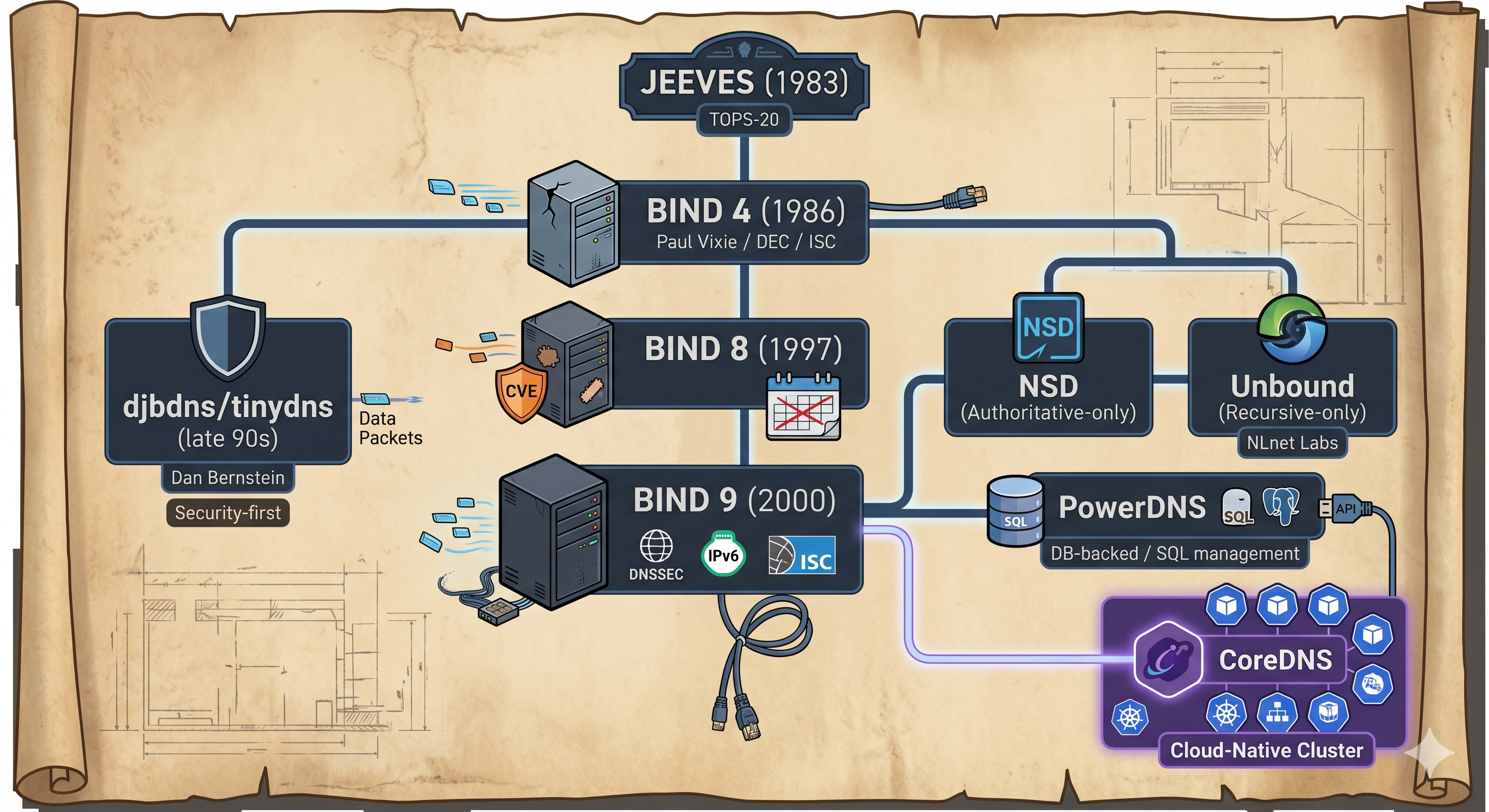
Paul Mockapetris published RFC 882 and 883 in 1983, defining what we now call DNS. The first working name server was called JEEVES, written for DEC TOPS-20 machines at USC-ISI and SRI-NIC. RFCs 1034 and 1035 followed in 1987 and remain the canonical specs that every DNS implementation today still claims compliance with.
The conceptual move was elegant: instead of one flat file, the namespace would be a tree. The root (.) delegates to top-level domains (com., org., country codes). Each TLD delegates to its registered domains (example.com.). And each domain owner runs (or pays someone to run) authoritative servers for their own zone. Resolution becomes a walk down the tree, with caching at every step so you don’t hammer the root every time someone visits Google.
BIND at Berkeley — the implementation that ate the internet
JEEVES ran on TOPS-20. The world ran on Unix. So in 1984, a team of graduate students at UC Berkeley’s Computer Systems Research Group (CSRG) — Douglas Terry, Mark Painter, David Riggle, and Songnian Zhou — wrote a Unix DNS server they called the Berkeley Internet Name Domain, or BIND. It shipped with 4.3BSD and has, in some form, run most of the internet ever since.
The lineage is worth knowing because it explains a lot of inherited weirdness:
- BIND 4 — the version that propagated everywhere. Notoriously creaky, repeatedly exploited. Paul Vixie picked up maintenance at DEC in 1988 and later founded the Internet Systems Consortium (ISC) around it.
- BIND 8 (1997) — incremental rewrite. The years of BIND 8 were the years of CVE-after-CVE; if you ran a name server in the late 90s, you spent a lot of weekends patching.
- BIND 9 (2000) — full rewrite, originally developed by Nominum and now maintained by ISC. DNSSEC, IPv6, TSIG, views, and modern zone tooling all entered the mainstream here.
BIND’s pain produced alternatives. Dan Bernstein’s djbdns/tinydns appeared in the late 90s as a minimalist, security-first reaction. NLnet Labs later split the responsibilities cleanly into NSD (authoritative-only) and Unbound (recursive-only) — a design choice that, as we’ll see in Part 2, foreshadows the cloud-native split. PowerDNS went the other direction, backing zone storage with a real database (MySQL, Postgres) so you could manage records via SQL or an API.
Quick correction to a myth I see repeated: BIND zone files are plain text, not Berkeley DB. The “Berkeley” in BIND is the university; the db. prefix on filenames (db.example.com) is a naming convention, not a database backend. The DB-backed name server you might be thinking of is PowerDNS.
The cloud-native turn: SkyDNS, Consul, and CoreDNS
Fast-forward to the mid-2010s. Containers are everywhere. Hosts come and go in seconds. The “edit a zone file, reload BIND” workflow is laughably wrong for a fleet of pods that live for 90 seconds.
A few projects converged on the answer:
- SkyDNS (Miek Gieben, around 2013-2014) — a Go DNS server backed by etcd. Services register themselves; SkyDNS serves SRV/A records dynamically. This was, conceptually, the moment DNS became a real-time service catalog instead of a static directory.
- Consul (HashiCorp, 2014) — bundled service registry, health checking, KV store, and a DNS interface (
*.service.consul). For many of us, Consul was the first time we typeddig @127.0.0.1 -p 8600 web.service.consuland watched a service catalog answer back. - CoreDNS (Miek Gieben, 2016) — a successor to SkyDNS, built as a fork of the Caddy web server because Miek liked Caddy’s plugin architecture. CoreDNS replaced kube-dns as the default Kubernetes cluster DNS in 1.13 (2018), and graduated from CNCF in January 2019 — the first project to graduate that year.
We’ll dive deep into Consul and CoreDNS in Part 2. For now, hold onto the lineage: every cluster DNS server you touch today is, in some sense, a great-grandchild of BIND.
How resolution actually flows
Before we look at record types, let’s nail the lookup path. When your laptop asks for portfolio.hagzag.com:
- Stub resolver on your OS (the libc resolver) reads
/etc/resolv.conf, finds a recursive resolver (your ISP,1.1.1.1, your router — whatever). - Recursive resolver checks its cache. Hit? Return. Miss? Walk the tree.
- It asks a root server (
.) — gets a referral to.comTLD servers. - Asks a
.comTLD server — gets a referral tohagzag.com’s authoritative name servers. - Asks an authoritative server for
hagzag.com— gets the answer. - The recursive resolver caches the answer (respecting TTL) and hands it back.
You can watch most of this with dig +trace:
$ dig +trace portfolio.hagzag.com
; <<>> DiG 9.18 <<>> +trace portfolio.hagzag.com
.            518400  IN  NS  a.root-servers.net.
...
com.         172800  IN  NS  a.gtld-servers.net.
...
hagzag.com.  172800  IN  NS  ns-cloud-c1.googledomains.com.
...
portfolio.hagzag.com. 300 IN A  185.199.108.153
Every step is cached somewhere. TTL is not advisory — it’s the entire performance and failover model. If you set a 24-hour TTL on a record and need to fail over, you will be sad for up to 24 hours. We’ll come back to this hard in Part 3.

The record types that matter
A and AAAA
The bread and butter. A returns IPv4, AAAA (pronounced “quad-A”) returns IPv6.
$ dig +short A example.com
93.184.215.14
$ dig +short AAAA example.com
2606:2800:21f:cb07:6820:80da:af6b:8b2c
Yes, you should publish AAAA records. In 2026, real users hit you over IPv6.
CNAME — and the apex problem
CNAME says “this name is an alias for that other name; resolve again.”
$ dig +short www.github.com
github.com.
140.82.121.4
Two important rules people forget:
- A CNAME cannot coexist with other records at the same name. No
CNAMEplusMX, noCNAMEplusTXT. The RFC is unambiguous. - You cannot put a CNAME at the apex of a zone (i.e.,
example.com.itself). The apex must hold SOA and NS records, and CNAME forbids siblings.
This second rule is the source of the ALIAS / ANAME problem. When you want example.com (no www) to point at an AWS load balancer, you can’t CNAME it. AWS Route 53 invented the alias record to solve this — at the protocol level it’s still just A/AAAA, but Route 53 resolves the LB’s hostname server-side and returns the IP directly. GCP and Azure have their own variants. We’ll come back to these in Part 3.
SOA and NS — the zone metadata
Every zone has exactly one SOA (Start of Authority) record and at least two NS (name server) records. The SOA holds the zone’s serial number, refresh/retry timers, and the email of the responsible party (with . instead of @):
$ dig hagzag.com SOA +short
ns-cloud-c1.googledomains.com. cloud-dns-hostmaster.google.com. 1 21600 3600 259200 300
When you change a zone, you bump the serial. Secondary servers compare serials and pull the new zone. It’s a 1980s sync protocol that still works.
MX — mail routing
MX records tell sending mail servers where to deliver mail for your domain. Each entry has a priority (lower wins):
$ dig +short MX gmail.com
5 gmail-smtp-in.l.google.com.
10 alt1.gmail-smtp-in.l.google.com.
If you’ve ever wondered why you set up MX records in Route 53 and email still didn’t work — it’s almost always because the destination’s spam filter rejected you, not DNS. Which brings us to TXT.
TXT — the swiss army knife
TXT records were originally meant for free-form notes. They are now load-bearing infrastructure for email security and domain verification. Three to know:
- SPF — declares which IPs are allowed to send mail for your domain
- DKIM — publishes the public key used to sign outgoing mail
- DMARC — tells receivers what to do when SPF or DKIM fails
$ dig +short TXT gmail.com | head -3
"v=spf1 redirect=_spf.google.com"
"google-site-verification=..."
"v=DMARC1; p=none; ..."  # actually at _dmarc.gmail.com
We’ll spend serious time on these in Part 4 when we discuss DNS-layer security. For now, internalize this: if you don’t publish SPF, DKIM, and DMARC, your domain will be spoofed.
What’s next
We’ve covered where DNS came from, how a query actually resolves, and the record types you’ll touch every day. In Part 2, we’ll watch all of this break under cloud-native conditions. Specifically: what happens when “the IP behind a name” changes every 90 seconds, and how Consul and CoreDNS solved a problem BIND was never designed for.
Continue the series:
- Part 2 — DNS at Scale: Service Discovery with Consul and CoreDNS
- Part 3 — DNS as a Load Balancer: AWS, GCP, Azure and the L3-to-L7 Stack
- Part 4 — When DNS Lies: Cache Poisoning, Spoofing, and How to Defend Yourself
Lab — Try It Yourself
Every post in this series ships a hands-on k3d lab. For Part 1, you’ll run a real BIND-9 authoritative server in a local Kubernetes cluster, edit a zone file, reload it, and watch resolution work end-to-end with dig.
Repo: github.com/hagzag/dns-evolution-in-practice
Lab: practice/part1/
git clone https://github.com/hagzag/dns-evolution-in-practice
cd dns-evolution-in-practice
task part1:run
Further Reading
- RFC 1034 — Domain Names: Concepts and Facilities
- RFC 1035 — Domain Names: Implementation and Specification
- Paul Vixie’s history of BIND at ISC
- CoreDNS project
Discussion