TL;DR
GitLab CI authenticates to AWS without static keys using id_tokens — a short-lived JWT that AWS trusts via the GitLab OIDC provider. A YAML anchor before_script writes the token to disk and configures an AWS profile in four lines. Job templates (.init_template, .plan_template, .apply_template) define the Terragrunt commands once. Concrete jobs extend the templates with one variable each: TG_ENV_DIR. Apply is always when: manual. Destroy doesn’t exist in the default pipeline — ever.
The accidental destroy that wasn’t
During a GitLab CI migration, a junior engineer set up a new pipeline and copied an apply job template. The copy included a rules block that ran on main branch push without the when: manual flag. Nobody caught it in review because the job name was apply:staging and it looked legitimate.
The next push to main after a routine env.hcl update auto-applied the staging environment. It worked correctly — no outage. But it was a coin flip. If the change had been something that required state migration or had a dependency ordering issue, it would have partially applied and left staging in an inconsistent state with no human at the wheel.
We added a pipeline lint step that day: CI fails if any apply or destroy job is missing when: manual. Enforce it as policy, not convention.
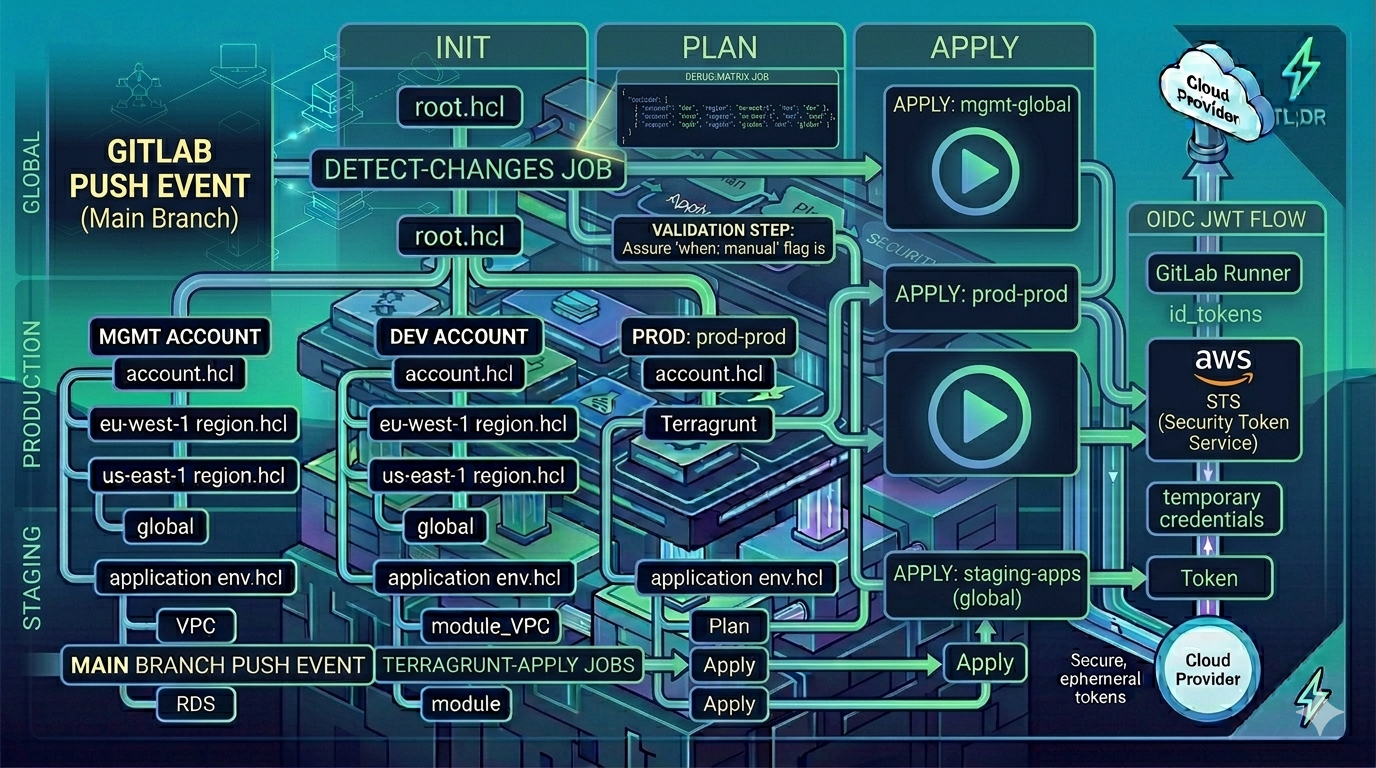
OIDC authentication: four lines that replace static keys
GitLab CI’s id_tokens block mints a JWT when the job starts. The audience claim (aud) must match what your AWS IAM OIDC provider expects.
# The OIDC setup — shared via YAML anchor
.aws_profile_setup:
  before_script: &aws_setup
    - mkdir -p ~/.aws
    - echo "${GITLAB_OIDC_TOKEN}" > /tmp/web_identity_token
    - |
      cat <<EOF > ~/.aws/config
      [profile ${AWS_PROFILE}]
      role_arn = ${ROLE_ARN}
      web_identity_token_file = /tmp/web_identity_token
      EOF
Four lines. Every job that needs AWS just references before_script: *aws_setup. The JWT is written to /tmp/web_identity_token, AWS reads it via web_identity_token_file, exchanges it for short-lived credentials, and your Terragrunt commands run with the resulting session.
Verify it’s working:
- aws sts get-caller-identity --profile ${AWS_PROFILE}If this returns the expected role ARN, the credential chain works. If it fails with InvalidClientTokenId, the OIDC provider isn’t trusted. If it fails with AccessDenied, the role ARN is wrong or the trust policy’s sub condition doesn’t match the GitLab project path.
ℹ️ OIDC audience for self-hosted GitLab
For GitLab.com, use
aud: https://gitlab.com. For a self-hosted instance, use your GitLab instance URL (e.g.,aud: https://gitlab.example.com). The AWS IAM OIDC provider must be configured with the same URL as the issuer. Mismatches between theaudclaim and the OIDC provider configuration are the most common auth failure.
The job template pattern
Three abstract templates, each extending the OIDC setup:
variables:
  AWS_REGION: "eu-west-1"
  AWS_PROFILE: "oidc"
  ROLE_ARN: "arn:aws:iam::111111111111:role/gitlab-ci-oidc-role"
  LOG_LEVEL: "info"
  TG_EXCLUDE_ARGS: ""

.init_template:
  stage: init
  id_tokens:
    GITLAB_OIDC_TOKEN:
      aud: https://gitlab.com
  before_script: *aws_setup
  script:
    - aws sts get-caller-identity --profile ${AWS_PROFILE}
    - |
      git config --global url."https://gitlab-ci-token:${CI_JOB_TOKEN}@gitlab.com/".insteadOf "https://gitlab.com/"
      terragrunt run --all init \
        --non-interactive \
        --log-level ${LOG_LEVEL} \
        --working-dir ${TG_ENV_DIR} \
        ${TG_EXCLUDE_ARGS}

.plan_template:
  stage: plan
  id_tokens:
    GITLAB_OIDC_TOKEN:
      aud: https://gitlab.com
  before_script: *aws_setup
  script:
    - |
      git config --global url."https://gitlab-ci-token:${CI_JOB_TOKEN}@gitlab.com/".insteadOf "https://gitlab.com/"
      terragrunt run --all plan \
        --non-interactive \
        --log-level ${LOG_LEVEL} \
        --working-dir ${TG_ENV_DIR} \
        ${TG_EXCLUDE_ARGS}

.apply_template:
  stage: apply
  rules:
    - if: '$CI_COMMIT_BRANCH == "main" && $CI_PIPELINE_SOURCE == "push"'
      when: manual      # ← non-negotiable
    - when: never
  id_tokens:
    GITLAB_OIDC_TOKEN:
      aud: https://gitlab.com
  before_script: *aws_setup
  script:
    - |
      terragrunt run --all apply \
        --non-interactive \
        --log-level ${LOG_LEVEL} \
        --working-dir ${TG_ENV_DIR} \
        ${TG_EXCLUDE_ARGS}
The git config rewrite in init and plan is necessary for private GitLab module repos: it rewrites https://gitlab.com/ URLs to use CI_JOB_TOKEN for authentication, so terragrunt init can clone module sources from private repos.
ℹ️
run --allin GitLab CISame as the GitHub Actions pipeline —
terragrunt run --allis the current syntax (v0.54+). Older pipelines usedterragrunt run-all. If your CI image pins an older Terragrunt version, use--experiment cli-redesignas a bridge. Update the image to>= 0.54and drop the flag.
Concrete jobs: static per environment
Each environment gets three concrete jobs:
# global environment
"init:global":
  extends: .init_template
  variables:
    TG_ENV_DIR: "${CI_PROJECT_DIR}/mgmt/eu-west-1/global"

"plan:global":
  extends: .plan_template
  needs: ["init:global"]
  variables:
    TG_ENV_DIR: "${CI_PROJECT_DIR}/mgmt/eu-west-1/global"

"apply:global":
  extends: .apply_template
  needs: ["plan:global"]
  variables:
    TG_ENV_DIR: "${CI_PROJECT_DIR}/mgmt/eu-west-1/global"

# production — with module exclusions for anything not CI-ready
"init:production":
  extends: .init_template
  variables:
    TG_ENV_DIR: "${CI_PROJECT_DIR}/prod/us-east-1/prod"
    TG_EXCLUDE_ARGS: "--queue-exclude-dir ${CI_PROJECT_DIR}/prod/us-east-1/prod/legacy-module"
The TG_EXCLUDE_ARGS variable uses --queue-exclude-dir to skip modules during run --all. This is the escape hatch for modules being migrated, requiring manual input, or managed by a different team — they stay in the directory tree but are skipped by CI.
This is a static pipeline — unlike GitHub Actions’ dynamic matrix, each environment is an explicit job definition. Adding an environment means editing .gitlab-ci.yml. The tradeoff: the pipeline is completely visible in the UI without matrix expansion, and GitLab’s DAG view gives you the dependency graph for free.
Why apply is always when: manual — and why the rule is absolute
The story at the top of this post is why. But there’s a systemic reason too.
GitLab CI pipelines run on every push that matches the branch rules. If apply is automatic, then every typo fix, every README update, every dependency bump that touches a .hcl file triggers an apply across however many environments are in the matrix. Most of the time, nothing bad happens. The one time something does, you don’t have a human in the loop to catch it.
when: manual costs one click per environment per deployment. In exchange, you get:
- A human confirms they intend the apply before it runs
- The apply doesn’t race with someone else’s manual local run
- You have a clear audit trail in the GitLab pipeline UI: who clicked, when
This is different from the GitHub Actions setup in Part 4, where apply is automatic on merge (with optional environment protection rules). Both are defensible. The manual gate is the right default for teams that are still building trust in the automation.
Shared CI templates for module repos
The shared-ci/tf-versioning-semantic-release.gitlab-ci.yml template (used in Part 2 for module repos) is included via GitLab’s include: directive:
include:
  - project: 'example-group/shared-ci'
    ref: main
    file: 'tf-versioning-semantic-release.gitlab-ci.yml'
Module repos get validation and semantic-release CI with zero per-repo configuration — they just need conventional commit messages and the include. The template writes a default .releaserc.yml if none exists.
What comes next in this series
This is the last post in the Terraform + Terragrunt track. But the series isn’t done.
Declarative IaC is a broad tent. Terraform HCL is one dialect. Over the coming posts I’ll cover:
- CDK for Terraform (CDKTF) — writing your infrastructure in TypeScript or Python, compiled to Terraform JSON. Same providers, same state, different mental model. Where it wins over HCL, where it makes things harder.
- Pulumi — infrastructure as actual code, with real type systems, real loops, and real functions. A fundamentally different approach to the “declare what you want” problem.
- OpenTofu — the open-source Terraform fork and where it stands today relative to HashiCorp’s BSL licensing change.
The 2025 series was Terragrunt and GitHub/GitLab CI because that’s what was in production at the time. The 2026 posts will add the alternatives I’ve been running in parallel. Same problem space, different tools.
Reference: tf-live demo repo · hagzag/tf-modules
Series Navigation
- ← Previous: Part 4 — CI/CD Pipelines for Terragrunt: GitHub Actions
- → Series Recap → Declarative IAC series recap
Discussion